Every booking, approved by your admin.
Your team requests a trip and the admin approves it. Nothing is booked before that. Every request is checked against your policy first, so the admin sees at a glance whether it fits, and approves in one tap.

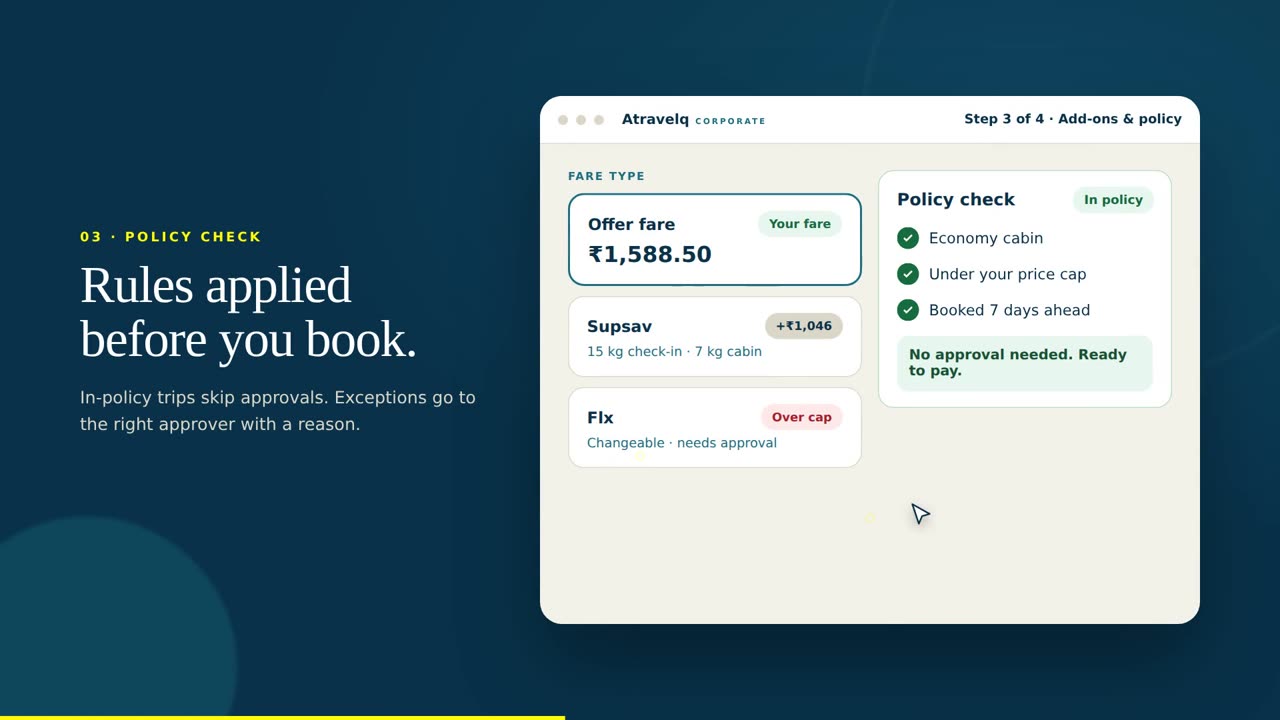
Policy that runs before the admin approves
Most tools tell you a trip broke policy after the ticket is issued. On Atravelq nothing is ticketed without the admin's approval, and the policy check is done before the request reaches them, so they approve with the facts in front of them.
Rules per team, grade or route
Leadership, sales and engineering can each have their own cabin, caps and approvers. Negotiated routes get their own treatment.
| Cabin | Economy · Premium over 4h | On |
| Price cap | ₹5,000 domestic · ₹40,000 intl | On |
| Advance booking | 7 days · over-cap flagged | On |
| Refundable only | On for leadership | Custom |
| Admin | Team admin → Finance over ₹25,000 | On |
Checked before the admin sees it
The check runs on every fare at search and on every request before it reaches the admin. The admin approves with the facts in front of them, not a report at month-end.
Every request, with the policy result attached
The admin sees the fare, whether it is in policy, the employee's note and the cheaper option, and approves or declines in one tap.
Traveller's note: "Client moved the meeting; only refundable fare left."
Nudges, not just blocks
Prefer non-stop, prefer economy, prefer rail under four hours: travellers see the nudge at search and the cheaper, greener choice becomes the easy choice.
Every request reaches my inbox with the policy check already done. Approving takes seconds, and nothing gets booked without me.
How a booking gets approved
Four steps, usually a couple of minutes. Click through them.
Nothing is booked yet. The policy check runs on the request: in policy, or over the cap with the gap and the in-policy alternatives shown.
If the fare is over the rules, a quick reason (or a note) goes with the request. No email, no form, no waiting to be asked "why".
The request arrives with the fare, the policy result, the reason and the cheaper option. Approve, decline or ask for a cheaper fare, one tap.
Only now is the wallet debited. The e-ticket goes out and the booking is on the ledger with the admin's name.
Try the policy check on your own numbers
Move the rules an admin would set and watch every fare re-check itself. Every request still goes to the admin; the check decides how much they need to look at.
Policy templates that grow with you
Start with three fields. Each step keeps what came before and adds a little.
Three fields, one admin
Economy, a cap and a few days' notice. The founder approves every request in one tap, by email or on the dashboard.
- Economy cabin
- ₹5,000 domestic cap
- 5 days' notice
- Founder approves by email
Per team, with a second signature
Different rules for sales and engineering, and finance signs the big ones.
- Everything in Startup
- Caps per team
- Premium economy over 4h
- Refundable-only for leadership
- Finance signs over ₹25,000
Per entity, grade and route
Cabin by grade, negotiated fares first, and two-level approvals across every entity.
- Everything in Growth
- Cabin by grade
- Negotiated fares first on busy routes
- Two-level approval with an SLA
- Policies per entity
Approvals that fit your business
Hand approvals to another admin for a week or for good; requests route to them automatically and the audit trail records who approved.
| Name | Team | Wallet | Policy |
|---|---|---|---|
| Priya Mehra | Sales | ₹10,000 | Sales · standard |
| Arjun Rao | Marketing | ₹6,000 | Standard |
| Sorav Singh | Leadership | ₹25,000 | Leadership |
| + Add person | via CSV or HR sync | — | Invite |
Trips over a threshold get a second approver after the first says yes. Set the threshold per policy.
Traveller's note: "Client moved the meeting; only refundable fare left."
Email or the dashboard: every request arrives with the policy check done. One tap to approve, and it is ticketed.
 Atravelq approvalsto Rahul S. · Email · 21:42
₹16,324.50 over the ₹5,000 cap · "Client moved the meeting; only refundable fare left."
Cheaper in-policy option: ₹1,588.50 (Offer fare, non-refundable)
What the traveller sees
Policy that feels like help, not a wall.
In-policy options first
Results are sorted with policy: what will be a one-tap approve for their admin comes first, with the cap shown.
Submit in one tap
The request goes to the right admin with the policy result. Over the cap? One tap adds the reason.
They can see where it is
Waiting, approved, declined: the status and the admin's usual reply time are on the trip screen.
Approved means ticketed
The moment the admin approves: e-ticket, calendar invite and invoice, with nothing more to do.
An audit trail on every booking
Who requested, what the policy check said, who approved and when, what was paid: every booking keeps its history.
- 01Every request is recordedThe policy result on each fare shown, not just the one requested.
- 02Every decision is keptThe employee's note and the admin's approval or decline, with timestamps and channel.
- 03Over-cap approvals are visible in analyticsBy team, by admin, by reason, with what they cost against the cap.
- 04Exportable for auditExcel/CSV per period, alongside the ledger and the GST invoices.
Frequently asked questions about policy and approvals
Can't find what you need? Your dedicated desk answers on +91 92500 00511, 24/7.
Cabin, price caps by route type, advance-booking days, refundable-only, non-stop preference and who the admin is for each team. Rules can differ per team, grade, route or entity.
They see it applied: in-policy fares first, and a clear flag on anything over the rules, with the cheaper option next to it, before they submit the request.
No. Every ticket is issued only after the admin approves the request. The policy check tells the admin whether the request is within the rules, so in-policy requests are a one-tap approve.
The admin gets the request instantly by email and on the dashboard with one-tap actions; the fare is held while they decide.
Set a delegate for a period; requests route to them automatically and the audit trail records who approved.
Yes. Your concierge raises the request within the same caps and rules; the admin approves it the same way.
Yes. Policies can be set per entity, team, grade or route, with a different admin for each.
Set your policy this afternoon
Three fields to start, every rule you will ever need when you grow. Your travellers can book by evening.
By continuing, you agree to receive product emails from Atravelq. See our Privacy Policy.